Scan Smart.
Stay Safe.
sniffQR shows you what is really inside a QR code, and tells you honestly when it cannot be sure.
Android is out now, iPhone is next. Same engine, same verdicts.
Pro is a one-time purchase, never a subscription
No accounts, no servers, no analytics
Same verdicts across the apps
Free browser extension
Free forever, with the same detection engine as the apps, running in your browser.
Four steps from unknown to known
Scan
Point your camera at any QR code, or scan from a photo or your clipboard (a photo or a text link). sniffQR detects and decodes it instantly.
Decode
The payload is identified and parsed: URLs, WiFi, contacts, crypto and more. Lookalikes and brand fakes are checked right on your device.
Analyze
Tap 'Check where this goes' to see the real destination. The link's site sees that, just like opening the link would. Your link goes only to the services you turned on: Web Risk online or offline, VirusTotal, or your feeds.
Verdict
Get a clear verdict ('Safe', 'Potentially Suspicious', 'Likely Malicious', or 'Unknown') before you open anything, with a plain-English reason for every non-Safe result.
Scan
Point your camera at any QR code, or scan from a photo or your clipboard (a photo or a text link). sniffQR detects and decodes it instantly.
Decode
The payload is identified and parsed: URLs, WiFi, contacts, crypto and more. Lookalikes and brand fakes are checked right on your device.
Analyze
Tap 'Check where this goes' to see the real destination. The link's site sees that, just like opening the link would. Your link goes only to the services you turned on: Web Risk online or offline, VirusTotal, or your feeds.
Verdict
Get a clear verdict ('Safe', 'Potentially Suspicious', 'Likely Malicious', or 'Unknown') before you open anything, with a plain-English reason for every non-Safe result.
What sets sniffQR apart
Tap a QR code. Know what is inside before you follow it.
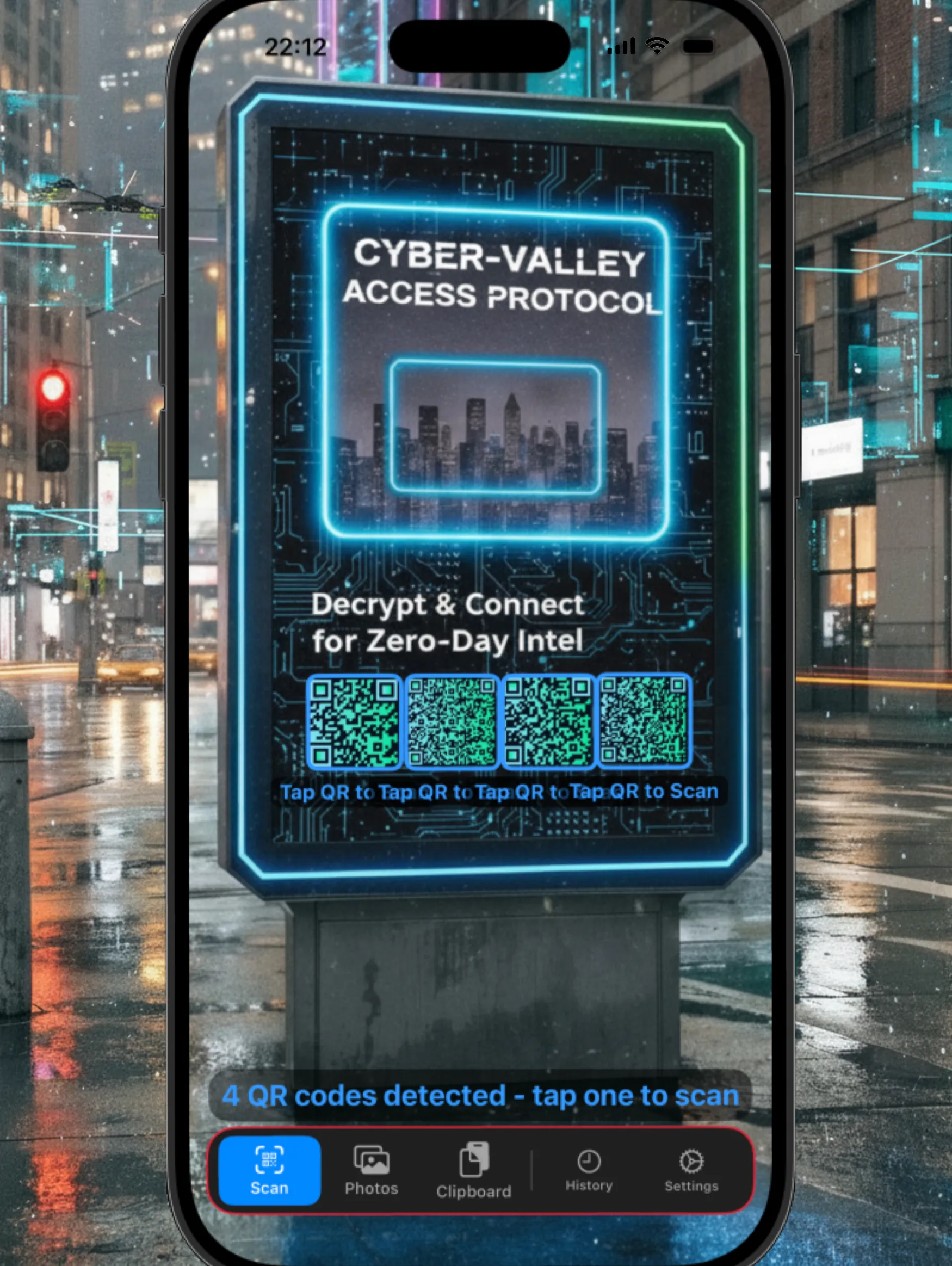
Nothing is checked until you say so
Nothing leaves your device until you say so. Every local check runs first. A link goes only to the threat services you turned on with your own key, and its own website is contacted only when you tap 'Check where this goes' or 'Preview Safely in App', or turn on 'Check links automatically'. Contact cards, Wi-Fi, calendar, crypto and 2FA codes stay private by default: zero network contact, and never sent to a custom feed. Email and contact-card domains are checked on your device only.
- Camera, photo, clipboard or share: every intake runs the same pipeline
- Local analysis runs before the first network call, always
- Turn on 'Check links automatically' and you tick which URLs on a redirect may be sent
- Contact, Wi-Fi, calendar, crypto and 2FA codes stay on the device by default
- The threat service you choose is the source of truth, and sniffQR never overrides it
The local detection engine is free, and it works offline
No key, no account, no purchase, no network. sniffQR reads the payload, and every URL in a redirect chain once you check it, for brand impersonation, hidden characters, harmful file types, shell commands and the user@host trick, among others. Then it names what it found, in plain English.
- Well-known brands checked for leetspeak, confusables, typo-squats and subdomain impersonation
- Harmful file types caught in both double-extension directions (invoice.pdf.exe and setup.zip.txt)
- Hidden characters stripped, counted and re-marked where they were
- Punycode decoded and re-scanned; TLS downgrades and WebSocket payloads flagged
- That is the shortlist. The features page has every check, platform by platform
URL Analysis
A shortened link is a mystery until it is followed. tap 'Check where this goes' and sniffQR walks the redirect chain and shows every stop with its own verdict marker, recovers the user@host disguise so the trick can be shown to you, and stops cold on an HTTPS to HTTP downgrade. Free follows one hop; Pro follows up to 15.
- Every hop shown with its own verdict marker
- Free follows 1 hop; Pro 1 to 15, defaulting to 5
- HTTPS → HTTP downgrades stop resolution and become a warning
- user@host disguises (example.com@evil.example) recovered and shown
- Off until you ask: tap 'Check where this goes', or turn on 'Check links automatically' (free everywhere)
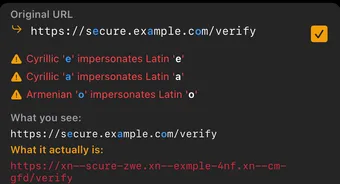
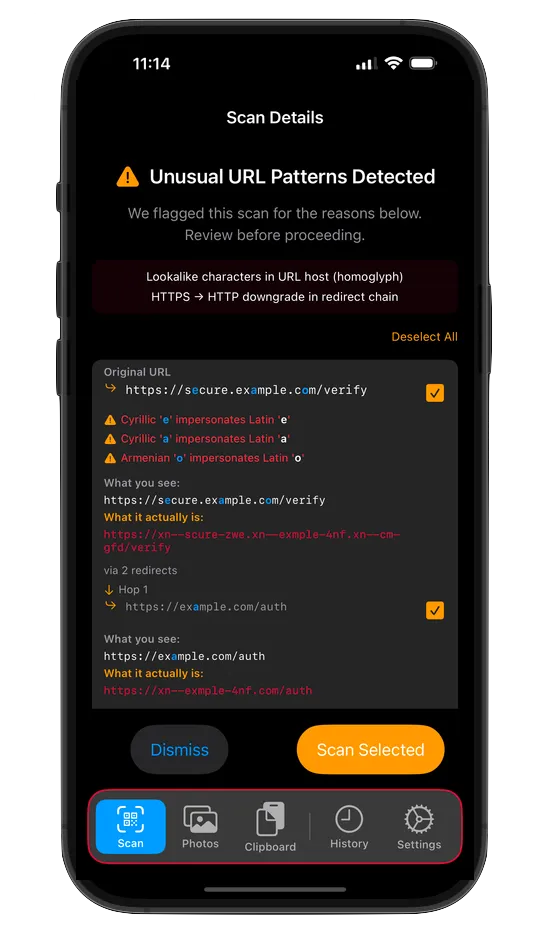
Some of those letters are lying to you
The domain example.com is easy to trust. But swap its Latin "a" for a Cyrillic "а" that looks identical, and you have a different website your eye cannot tell apart. Neither can your browser. sniffQR can. It shows you the real punycode address next to what you saw, so the look-alike has nowhere to hide.
- Look-alike characters across five scripts, named down to the exact Unicode character
- The real punycode address shown next to what you saw
- Checked in every payload type, not just links
- A name written honestly in one script never trips it
Example scan. Service results are simulated.
Threat Intelligence
Check a link against real threat databases you turn on. Google Web Risk works with your own key. Pro adds VirusTotal (Premium API key required), up to 8 custom threat feeds, and Google Web Risk (Offline), which checks links on your phone. If a possible match is checked with Google, only a short piece of the link's fingerprint is sent, never the link itself.
- Google Web Risk on the free tier, with your own key
- VirusTotal (Premium API key required) checked by a SHA-256 fingerprint, never the URL (Pro)
- Up to 8 custom threat feeds (Pro)
- Google Web Risk (Offline) with a local hash database (Pro)
It would rather say it does not know
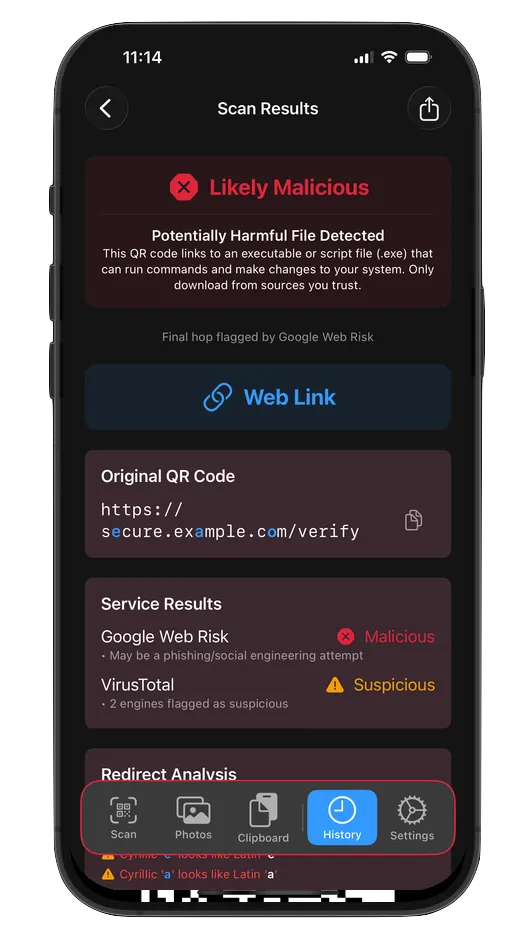
Four verdicts: 'Safe', 'Potentially Suspicious', 'Likely Malicious', and 'Unknown'. 'Unknown' is the point, not an omission. A 'Safe' verdict requires a threat service to have actually said so. A missing key, a skipped check, a rate limit, a dead destination or a short link nobody checked: all of them report 'Unknown', and the screen tells you which. Every non-Safe verdict has to explain itself in plain English.
- No check means 'Unknown', never 'Safe'
- Only a true 'Safe' opens without a confirmation
- Per-hop rows distinguish 'Not checked' from 'Unknown'
- A long chain or a dead destination is shown as context, not an accusation
- Reason-free results can only ever be 'Safe'
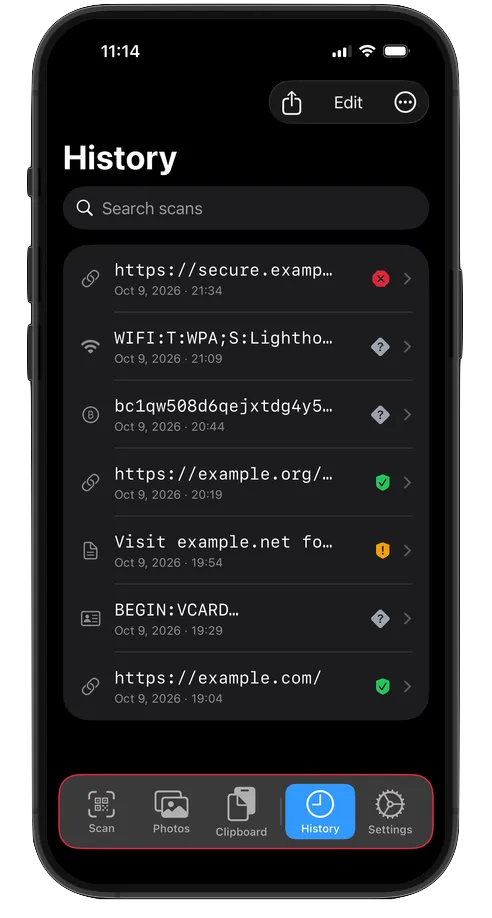
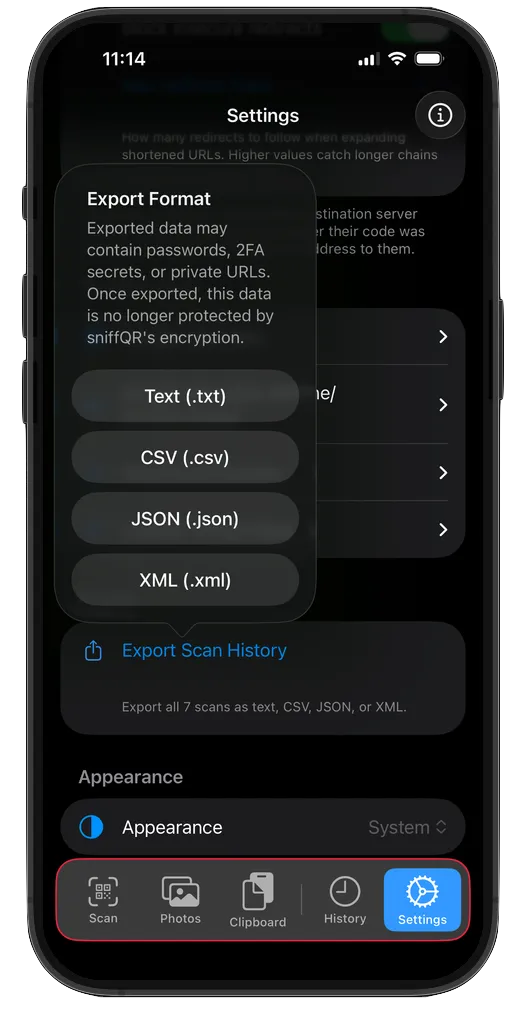
Example scans. Service results are simulated.
History & Export
Every scan saved with its verdict, redirect chain and timestamp, searchable down to the Unicode character name. Free keeps your newest 5 visible and nothing older is deleted. Pro makes it unlimited and exportable.
- Unlimited history with Pro; free shows the newest 5, older scans are retained
- Search the value, verdicts, redirect chain and flagged characters
- Export to TXT, CSV, JSON or XML (Pro)
- Deleting records and sharing a single result are free
App Security
sniffQR protects itself as seriously as it protects you. A biometric lock that fails closed ('Lock on Exit'), your scan history encrypted on the device, and every link previewed in an isolated browser in the apps.
- Biometric lock ('Lock on Exit') with device-credential fallback, fails closed
- Scan history encrypted at rest with per-field AES-256-GCM
- Copied passwords and 2FA secrets auto-clear from the clipboard
- Certificate pinning on the built-in services; no analytics, telemetry or ads
- A non-blocking warning if the device looks jailbroken or rooted
Same answer on every platform
The same QR code gives you the same verdict on your phone, their phone, and your laptop. The apps and the extension are verified against each other before every release. The apps give the same verdict, and the extension differs only where a browser cannot see, each difference documented.
- One shared detection engine behind every app
- Android, iPhone and the extension verified against each other before release
- The only differences are browser limits, each documented
Nothing is checked until you say so
Consent architectureNothing leaves your device until you say so. Every local check runs first. A link goes only to the threat services you turned on with your own key, and its own website is contacted only when you tap 'Check where this goes' or 'Preview Safely in App', or turn on 'Check links automatically'. Contact cards, Wi-Fi, calendar, crypto and 2FA codes stay private by default: zero network contact, and never sent to a custom feed. Email and contact-card domains are checked on your device only.
The local detection engine is free, and it works offline
Free on every platformNo key, no account, no purchase, no network. sniffQR reads the payload, and every URL in a redirect chain once you check it, for brand impersonation, hidden characters, harmful file types, shell commands and the user@host trick, among others. Then it names what it found, in plain English.
URL Analysis
Core FeatureA shortened link is a mystery until it is followed. tap 'Check where this goes' and sniffQR walks the redirect chain and shows every stop with its own verdict marker, recovers the user@host disguise so the trick can be shown to you, and stops cold on an HTTPS to HTTP downgrade. Free follows one hop; Pro follows up to 15.
Some of those letters are lying to you
The attack you cannot seeThe domain example.com is easy to trust. But swap its Latin "a" for a Cyrillic "а" that looks identical, and you have a different website your eye cannot tell apart. Neither can your browser. sniffQR can. It shows you the real punycode address next to what you saw, so the look-alike has nowhere to hide.
Example scan. Service results are simulated.
Threat Intelligence
Your keys, your servicesCheck a link against real threat databases you turn on. Google Web Risk works with your own key. Pro adds VirusTotal (Premium API key required), up to 8 custom threat feeds, and Google Web Risk (Offline), which checks links on your phone. If a possible match is checked with Google, only a short piece of the link's fingerprint is sent, never the link itself.
It would rather say it does not know
The honest verdictFour verdicts: 'Safe', 'Potentially Suspicious', 'Likely Malicious', and 'Unknown'. 'Unknown' is the point, not an omission. A 'Safe' verdict requires a threat service to have actually said so. A missing key, a skipped check, a rate limit, a dead destination or a short link nobody checked: all of them report 'Unknown', and the screen tells you which. Every non-Safe verdict has to explain itself in plain English.
Example scans. Service results are simulated.
History & Export
Free · unlimited with ProEvery scan saved with its verdict, redirect chain and timestamp, searchable down to the Unicode character name. Free keeps your newest 5 visible and nothing older is deleted. Pro makes it unlimited and exportable.
App Security
Built InsniffQR protects itself as seriously as it protects you. A biometric lock that fails closed ('Lock on Exit'), your scan history encrypted on the device, and every link previewed in an isolated browser in the apps.
Same answer on every platform
Enforced, not claimedThe same QR code gives you the same verdict on your phone, their phone, and your laptop. The apps and the extension are verified against each other before every release. The apps give the same verdict, and the extension differs only where a browser cannot see, each difference documented.
Know what is in a QR code
before you act on it
Out now: the Android app on Google Play and the free browser extension. Next: iPhone. The apps add the camera, the offline threat database, VirusTotal, custom threat feeds, history and the rest of the Pro toolkit. One payment, never a subscription.
Android is out now, iPhone is next. Same engine, same verdicts.
Free browser extension
Free forever, with the same detection engine as the apps, running in your browser.